Download
The simplest way to get a copy of Eclipse with Epsilon 2.5 and all its dependencies installed, is to download the Eclipse Installer and select Epsilon.
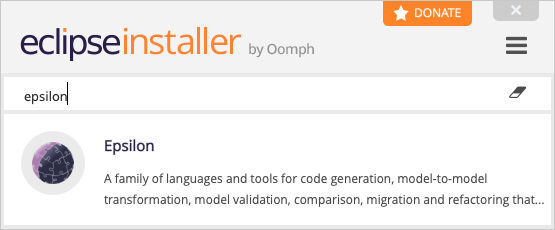
Can't find Epsilon?
If you don't see Epsilon in the list, click on the three vertical bars on the top right, then Product Catalogs and check "Eclipse.org Applications". Epsilon should be near the bottom of the list (you can also use the search bar). If the Product Catalogs option is missing, switch to Advanced Mode and look for Epsilon under "Eclipse.org Applications" (if this category is missing, click on the small yellow folder icon in the top right corner and select it). Keep pressing Next (you don't need to change anything) and then Finish. Accept the licenses when prompted.
Warning
Please do not select the Epsilon project on the second page of the installer in Advanced Mode. This is for Epsilon developers only and may cause issues during installation of the Epsilon product.
Update Sites
Alternatively, you can use the following update sites through the Help → Install new software menu in Eclipse to install (parts of) Epsilon.
| Site | Location |
|---|---|
| Stable | http://download.eclipse.org/epsilon/updates/2.5/ |
| Interim | http://download.eclipse.org/epsilon/interim/ |
Eclipse failing to find dependencies?
While Epsilon update sites contain references to all 3rd party dependencies and shouldn't require installing any prerequisites separately, Eclipse's installation system (p2) can be temperamental and occasionally fail to find external dependencies. In this case, installation can fail with the following message: Cannot complete the install because one or more required items could not be found.
When this happens, please untick the Contact all update sites during install to find required software option and try again. Alternatively, you can try installing Epsilon through the Eclipse installer (see above), which is more reliable. If none of this works for you, please post a message to the forum.
How often is the interim update site rebuilt?
The interim update site is rebuilt automatically with every push to the main branch of the Epsilon repo. Bugs fixed in the interim version (compared to the latest stable version) are listed here
Archived Update Sites
Below are also links to compressed versions of the Epsilon update sites for long-term archival and to support users who are behind corporate firewalls.
Eclipse Marketplace
If you prefer to install Epsilon through the Eclipse Marketplace, you can drag and drop  into a running instance of Eclipse.
Source Code  

The source code of Epsilon is in the following Git repository.
| Type | Location |
|---|---|
| Repository | https://github.com/eclipse/epsilon |
| Release tag | https://github.com/eclipse/epsilon/releases/tag/2.5 |
Additional projects which are experimental or have dependencies which are incompatible with the Eclipse Public License are available in Epsilon Labs.
Maven
Epsilon JARs are available from Maven Central. For
instance, to use the EOL engine JAR from your pom.xml:
<dependencies>
    <dependency>
        <groupId>org.eclipse.epsilon</groupId>
        <artifactId>org.eclipse.epsilon.eol.engine</artifactId>
        <version>2.5.0</version>
    </dependency>
</dependencies>
To use the latest SNAPSHOT (interim) version of Epsilon, you should add the Sonatype snapshots repository to your pom.xml and set the version of the Epsilon libraries to 2.6.0-SNAPSHOT as shown below.
<repositories>
    <repository>
        <id>ossrh</id>
        <url>https://oss.sonatype.org/content/repositories/snapshots</url>
    </repository>
</repositories>

<dependencies>
    <dependency>
        <groupId>org.eclipse.epsilon</groupId>
        <artifactId>org.eclipse.epsilon.eol.engine</artifactId>
        <version>2.6.0-SNAPSHOT</version>
    </dependency>
</dependencies>
Older versions
Previous stable versions of Epsilon are available here.
This website
This article demonstrates how to download and manage the Epsilon website in your machine.